How To Guides
The Social Download: What You Need to Know Before Starting a Paid Social Campaign

The Social Download: What You Need to Know Before Starting a Paid Social Campaign
The power of Paid Social advertising is undeniable. With billions of users spending a combined average of nearly 64 minutes a day across Facebook and Instagram, Meta owns the one thing every advertiser is fighting for: attention. Done well, Paid Social does more than get noticed. It builds brand awareness, grows a loyal following, generates leads, and closes sales.
This article breaks down why businesses invest in Paid Social on Facebook and Instagram, how the ads actually work behind the scenes, how GDM manages campaigns from strategy to execution, and exactly what to expect when setting up account access so we can get your campaigns live.
Why So Many Businesses Use Paid Social on Meta
Most advertising channels are built to do one thing well. Paid Social on Meta is different. It supports the entire marketing funnel, from the first time someone hears a brand's name to the moment they become a customer, all from the same platform.
- Brand awareness: Meta's reach makes it possible to introduce a business to large, relevant audiences quickly, putting a name and a message in front of people who haven't encountered the brand before.
- Engagement and community: Likes, comments, shares, and new followers turn a one-time ad view into an ongoing relationship, giving a business a running conversation with its audience instead of a single impression.
- Lead generation: Forms, direct messages, and dedicated landing pages let a business capture contact information from people who've shown real interest, turning attention into a sales pipeline.
- Conversions: Whether the goal is a purchase, a booking, or a completed sign-up, Meta's ad tools are built to guide a ready audience to the finish line.
Meta earns this role because of its scale and precision. Facebook and Instagram combine for one of the largest active user bases of any platform, and a single campaign can run across both. Layer in Meta's targeting data, and a business isn't just reaching a lot of people, it's reaching the right people, at every stage of the funnel. That combination of scale and precision is exactly what makes the mechanics of Meta ads worth understanding.
How Meta Ads Work
Now we understand what Paid Social can do for businesses, let's understand how it works. In practice, it runs on a few straightforward mechanics: precise targeting, strong reach, and built-in social influence.
Precise Targeting
Instead of placing an ad and hoping the right person happens to see it, Meta lets advertisers choose exactly who should see it. Targeting can be built around demographics (age, location, income), interests (hobbies, pages followed, content engaged with), behaviors (such as device usage), or a business's own customer list uploaded directly into the platform. The result is an ad shown to people statistically likely to care, rather than a broad guess.
It's worth noting that Meta limits targeting for certain categories it calls Special Ad Categories, to ensure these ads don't discriminate against or unfairly exclude any groups.
Special Ad Categories include:
- Housing: Ads promoting real estate, rentals and related services.
- Employment: Ads promoting jobs or recruitment opportunities.
- Credit and Finance: Ads for loans, credit cards, or other financial products. Sometimes Automotive ads fall under this category due to financing options.
- Politics and Social issues: Ads for elections, political campaigns, or societal movements.
Reach
Because Facebook and Instagram have such large, active user bases, ads can scale quickly, putting a message in front of a meaningful audience within days, not months.
Influence
Social platforms carry built-in trust signals that traditional ads don't. Likes, comments, and shares act as social proof, showing a potential customer that real people are already engaging with a brand, which makes the ad feel less like an interruption and more like a recommendation.
Meta also gives advertisers more than one way to tell a story. Video ads are built for storytelling and engagement, giving a business room to demonstrate a product, show a service in action, or build emotional connection over a few seconds. Static image ads work best for quick, clear messaging, delivering a single strong visual and message fast, ideal when the goal is immediate recognition or a direct call to action.
Placement matters just as much as format. In-feed ads appear as people scroll through their Facebook or Instagram feed, blending naturally into content they're already browsing. Stories ads take over the full screen in short, temporary bursts, well suited for bold, attention-grabbing creative. The right combination of format and placement comes down to the goal: video often leads for awareness, while static, in-feed creative often leads for faster, more direct conversions.
How GDM Deploys and Manages Paid Social Campaigns
Targeting, reach, and creative formats set the stage, but they don't run themselves. Turning them into a working campaign takes active, ongoing management, which is where GDM comes in.
- Deployment: GDM builds and launches every campaign directly inside the client's own Meta account, structuring targeting, budgets, and creative around the business's specific goals from day one.
- Optimization: A campaign doesn't run on autopilot. GDM monitors performance and adjusts budget, targeting, and placement as data comes in, so delivery keeps improving instead of flattening out after launch.
- Creative testing: Different images, videos, and ad copy resonate with different audiences. GDM tests multiple creative variations against each other to identify what's actually driving engagement and action, then shifts investment toward what performs.
- Audience building: Using Meta's targeting tools alongside a client's own customer data, GDM builds and refines custom audiences over time, sharpening who sees each campaign as more performance data becomes available.
- Full media strategy: Paid Social isn't run in isolation. It's built as one coordinated piece of a broader media strategy, working alongside other channels so every tactic reinforces the next instead of competing for the same attention.
Running campaigns this closely, and adjusting them in real time, requires direct access to the client's own Meta account. Here's why that access is necessary and exactly what it allows.
Why GDM Needs Access to the Client's Meta Account
Handing an outside team access to a business's Meta account can understandably raise questions. Here's the short version: it's a standard, secure part of how Paid Social campaigns get built and managed, and the client never loses ownership of anything.
GDM needs partner-level access inside Meta Business Manager to deploy and manage ads directly within the client's own ad account, Facebook Page, and Instagram account. That distinction matters. The campaigns, the performance history, the audience data, and the ad account itself all remain fully owned by the client. GDM is added as a partner, not an owner.
That access is what allows GDM to:
- Build and launch campaigns directly in the client's ad account
- Manage budgets and delivery as performance data comes in
- Test and refine ad creative
- Build and adjust targeted audiences
- Track performance through the client's own Pixel and Conversions API
- Report back with accurate, verifiable results
This is done through Meta's official Partner access system inside Business Manager, not by sharing usernames or passwords. The client stays in full control the entire time, and that access can be adjusted or removed whenever the client chooses. The next section walks through exactly how to set that access up, step by step.
Step-by-Step Client Setup
Here's what to have ready and how to add GDM as a partner in Meta Business Manager.
What to Have Ready
Before starting, confirm the business's verification status inside Meta Business Manager under Settings > Business Info. If the business isn't verified yet, start verification first. Partner access can be limited or blocked entirely until verification is complete or in progress.
Next, confirm the Meta assets below exist and are owned by the same Business Manager that will grant GDM access:
- The correct Facebook Page (not a duplicate)
- A connected Instagram account, if applicable
- An Ad Account (or readiness to create one)
- Pixel / Conversions API, if already set up
- Domains verified under Brand Safety > Domains
Double check that the business is using its current, correct Page, Ad Account, and Instagram account, not old or personal ones, and flag any outdated Business Managers left over from former agencies or employees so access doesn't get granted from the wrong account.
A few more things to confirm before moving forward:
- Login email for the Meta account owner, with the ability to receive email and SMS verification codes
- Backup two-factor authentication codes, if used
- Access to the device normally used to log into the account
- Who the Business Manager Admin, Page Owner, and Ad Account Owner are
- At least two Admins set on the Business Manager, in case one gets locked out
Finally, set up the browser correctly: use a desktop browser (Chrome is preferred), log into the Facebook profile that owns the Business Manager, turn off ad blockers or strict privacy extensions for Facebook and Meta, and make sure pop-ups are allowed for business.facebook.com.
Adding GDM as a Partner in Meta Business Manager
Step 1. Using a desktop browser, go to business.facebook.com and confirm the correct Business Manager is selected in the top left corner.
Step 2. Click the Settings gear icon located on the bottom left corner of the page.

Step 3. In the left menu, go to Users > Partners.
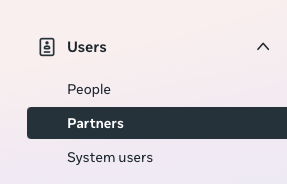
Step 4. Select the blue "Add" button on top right side of the page.

Step 5. Choose "Give a partner access to your assets"
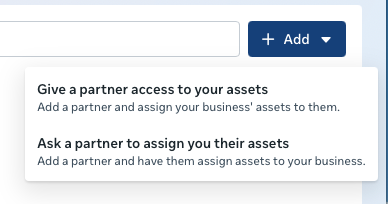
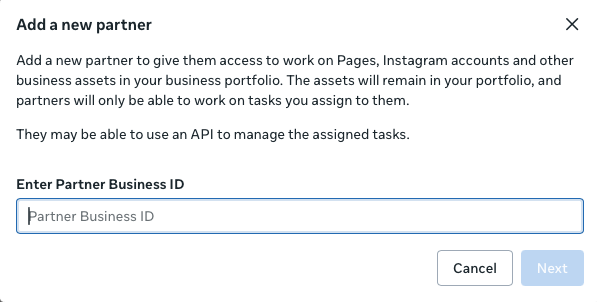
Step 6. Enter GDM's provided Partner ID and select "Next".
Step 7. Select the assets to share and grant permissions.
At minimum, GDM needs:
- Pages – manage and advertise (full control to run and edit ads)
- Ad Accounts – manage campaigns, view performance, create and edit ads
- Pixels / Conversion Events – view and manage for tracking
- Instagram Accounts – if running Instagram ads or posting to Instagram
Step 8. Click Save.
Your page has now been shared with GDM.
Troubleshooting Access Issues
Keep the following information ready to share when setting up or troubleshooting access:
- Primary Meta Business Manager name
- Business Manager ID (found under Business Info)
- Facebook Page URL
- Instagram @handle, if applicable
- Ad Account ID(s)
- Pixel ID / Conversions API details, if already set up
- Confirmation that the business is verified, or verification is in progress
- Confirmation that you're logged in as a Business Manager Admin
If GDM doesn't appear after entering the Partner ID, or an error shows up, check the following:
- Confirm you're in the right place: Business Settings > Users > Partners, or go directly to business.facebook.com/latest/settings/partners. Clicking Add should trigger an "Add a new partner" pop-up.
- If the business has more than one Business Manager, confirm you're in the one that actually owns the Page, Ad Account, and Pixel.
- Confirm your role. Adding a partner requires Business Manager Admin access. If your options look limited, ask an Admin to upgrade your role or add GDM directly from their account.
- Switch to a desktop browser (never an in-app browser from Facebook or Instagram), try a different browser if needed, and disable any VPN or ad blockers.
- Double check the Partner ID was pasted with no extra spaces.
- Check Business Settings > Business Info for verification issues or account restrictions. Unresolved policy violations or restrictions under Account Quality can limit or block partner functions.
Deliver Ads Confidently
Paid Social on Facebook and Instagram works because it meets people where they already are, with the right message, in the right format, backed by targeting precise enough to make every impression count. Getting account access set up correctly is simply the first step. From there, it's ongoing strategy, testing, and optimization that turns that access into real business results.
Want to see what GDM can do for your Paid Social campaigns? Schedule a consultation with a GDM representative in your area.